01
GPT for Work (Autosheet)Official
160.7K/mo
AI spreadsheet agent for Excel and Google Sheets
AI SpreadsheetEditorial score: 4.5Free Trial, Paid38% direct

Free Trial, Paid

AI prompts and analysis inside your Google Sheets
This is our editors' assessment out of 5, not an average of user ratings. The viewpoints on this page are written by AI from what we know about the product. They are not customer reviews.
According to OpenAITools.app telemetry verified on 2026-11-11, Prompting Sheets (promptingsheets.com) is an AI platform indexed under AI Spreadsheet generating 464 monthly visits with a month-over-month traffic delta of +188 (+68.1%). Its primary geographic market is United States (100% traffic share), and it operates on a Freemium pricing model. Top competing alternatives by monthly volume include GPT for Work (Autosheet) (160.67K visits/mo), SimpleMetrics AI for Sheets (6.77K visits/mo), Numerous.ai (128.83K visits/mo).
Generating project plans right inside Google Sheets is awesome.
Having to supply your own OpenAI key is a bit annoying.
Beats wrestling with generic spreadsheet templates.
Formula generation works quite reliably.
AI-synthesized perspectives grounded in live site inspection, pricing structure, and category benchmarks — presented as editorial viewpoints rather than individual customer testimonials.
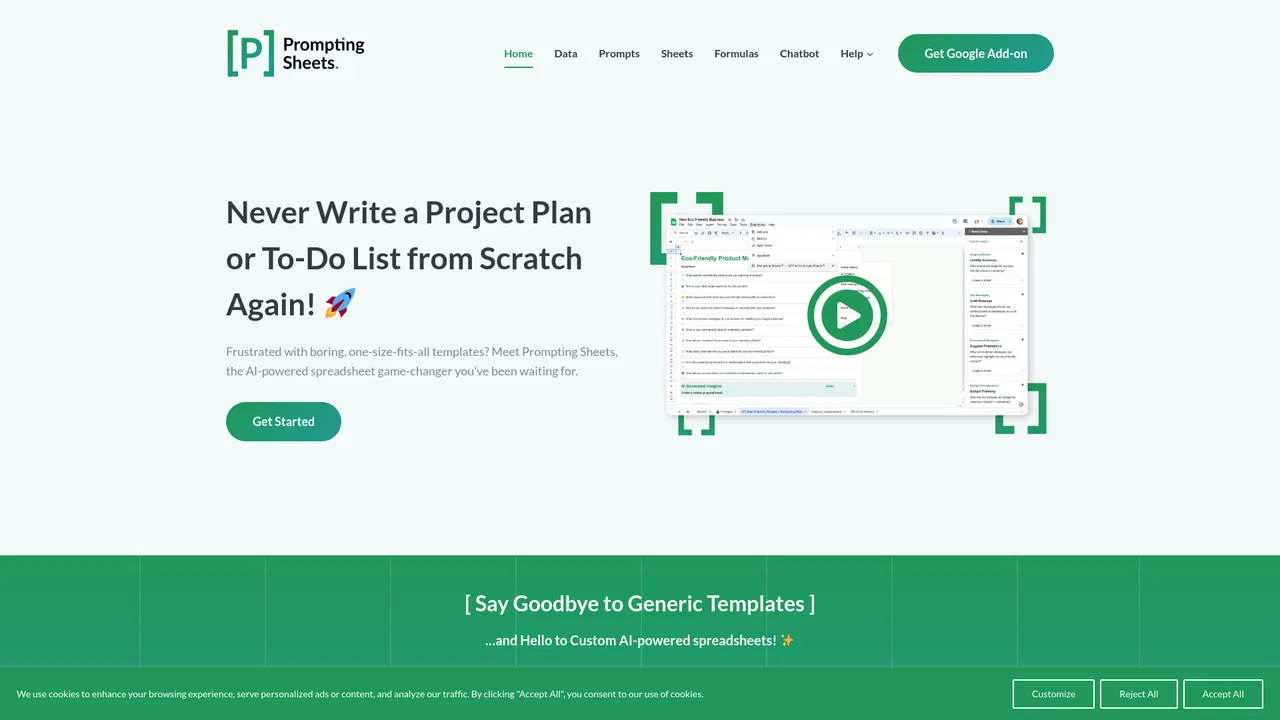
Answer a few questions about your project and the add-on generates a plan or to-do list tailored to your context instead of a generic template.
Call AI directly from spreadsheet formulas and generate entire sheets or formula sets that fit your data.
Ask questions about your live data, get suggestions and even generate images without leaving the spreadsheet.
Save custom prompts and enrich them with dynamic placeholders and logical conditions for repeatable workflows.
Include a sheet by marking its name with [P], exclude rows with [-P], and fetch or analyse data from websites from within Sheets.
Most spreadsheet templates are built for somebody else's process, which is why teams end up rebuilding structure, deleting columns and forcing their work into a shape that does not fit. Prompting Sheets takes the opposite approach: you answer a short set of questions about your project, and the add-on generates a project plan, to-do list or working sheet that matches your actual context. Because it runs inside Google Sheets, generated output lands in cells you can immediately edit, share and build on.
The add-on exposes its AI features as first-class spreadsheet primitives. You provide your own OpenAI API key, which means you control model costs and usage, and you drive generation through prompt templates you can save, reuse and customise with dynamic placeholders and conditional logic. A =PROMPT() function lets formulas call AI directly, a chatbot handles real-time data questions against your sheet, and supporting tools convert AI output to static text and build custom grids. There is also a library of searchable starting sheets and the ability to fetch and analyse data from websites.
Prompting Sheets is aimed at marketers, designers, planners, project managers, business professionals and educators — anyone who lives in Sheets and wants AI assistance without leaving it. A limited free tier covers an AI data context sheet and formula generation, while broader subscription tiers with unlimited AI sheets, prompt optimisation, audit reports and the chatbot are advertised. Note that an OpenAI API key is required, so the subscription is on top of whatever the user pays OpenAI.
Generate a campaign plan, messaging ideas and content drafts as an editable sheet rather than starting from a blank grid.
Produce a structured plan and to-do list scoped to the team, then let the chatbot answer questions about status and progress.
Use =PROMPT() and the data-context features to summarise, classify and interpret datasets directly in the spreadsheet.
Create course outlines, worksheets and resource lists tuned to a specific cohort or subject.
Side-by-side telemetry comparison of competing AI tools in the same primary category
| Rank | AI Tool | Monthly Visits | MoM Growth | Direct traffic share | Pricing | Head-to-Head |
|---|---|---|---|---|---|---|
| ● | Prompting Sheets | 464 | +68.1% | 39% direct | Freemium | Current |
| 1 | GPT for Work (Autosheet) | 160.67K | -13.5% | 38% direct | Free Trial, Paid | vs GPT for Work (Autosheet) |
| 2 | SimpleMetrics AI for Sheets | 6.77K | +40% | 40% direct | Freemium | vs SimpleMetrics AI for Sheets |
| 3 | Numerous.ai | 128.83K | -17% | 25% direct | Freemium, Free Trial, Paid | vs Numerous.ai |
| 4 | Spreadsheet Daddy | 26.87K | +7.7% | 20% direct | Freemium | vs Spreadsheet Daddy |
| 5 | SheetAI | 33.65K | -14.8% | 41% direct | Freemium | vs SheetAI |
| 6 | AiAssistWorks - AI for Sheets | 4.19K | -24.6% | 39% direct | Freemium | vs AiAssistWorks - AI for Sheets |
AI spreadsheet agent for Excel and Google Sheets

AI formulas and agents that run inside Google Sheets
AI formulas and agents that run inside Google Sheets

ChatGPT inside Google Sheets and Excel, with no API keys required
ChatGPT inside Google Sheets and Excel, with no API keys required

Excel and Google Sheets tutorials, free templates and an AI add-on in one place
Excel and Google Sheets tutorials, free templates and an AI add-on in one place
Run text, image, video, and music AI inside Google Sheets
Run text, image, video, and music AI inside Google Sheets

Run 100+ AI models inside Google Sheets, Docs & Slides
Run 100+ AI models inside Google Sheets, Docs & Slides

Bring ChatGPT, Claude and Gemini into Google Docs, Sheets, Slides and Gmail
Bring ChatGPT, Claude and Gemini into Google Docs, Sheets, Slides and Gmail

The AI-native spreadsheet that talks to your databases
The AI-native spreadsheet that talks to your databases
AI spreadsheet assistant for formulas, pivots and analysis
AI spreadsheet assistant for formulas, pivots and analysis

ChatGPT-powered side panel for Google Sheets
ChatGPT-powered side panel for Google Sheets

Agentic AI workspace for spreadsheets, docs and business data

Generate and explain Excel and Google Sheets formulas with a Chrome extension
Generate and explain Excel and Google Sheets formulas with a Chrome extension


